Best Text to Speech Tools in 2026: 9 Text to Voice AI Apps Compared
Find the best text to speech tool for you. We compare 9 text to speech and text to voice AI apps on free tiers, price, voices, languages and export formats.
By Dessa AI Team · Updated
What Is the Best Text to Speech Tool in 2026?
The best text to speech tool depends on the job. ElevenLabs is the best text to speech tool for expressive voices and voice cloning. Murf AI is the best text to speech for business and training voiceovers. Dessa AI is the best text to speech tool if you want text to voice AI and a real-time AI voice chat in one browser studio, with no subscription needed. TTSMaker is the best free text to speech for zero budgets.
Text to speech (TTS), also called text to voice AI, turns a written script into spoken audio you can play or download. This guide compares nine text to speech tools you can open and use today, as of November 2026, on free tiers, prices, voices, languages, export formats and commercial rights. Facts come from each maker's own pages. PlayHT, LOVO and Resemble AI were left out: PlayHT shut down at the end of 2025, LOVO's pricing page no longer loads, and Resemble AI now sells deepfake detection instead of text to speech.
Comparison Table
| Text to speech tool | Free tier | Cheapest paid | Voices / languages | Export | Commercial use on free? |
|---|---|---|---|---|---|
| Dessa AI | None | Packs from $9.90; plans from $19.90/mo | 24 / 39 | WAV, 44.1 kHz | No free tier; yes with paid credits |
| ElevenLabs | 10,000 credits (about 10 min) | Starter $6/mo | 10,000+ community voices / 70+ | MP3, PCM, Opus | No |
| Murf AI | 10 min, no downloads | Creator $19/mo billed yearly | 200+ / 35 | MP3, WAV, FLAC (paid) | No |
| Speechify Studio | 600 credits | Starter $100/year | 1,000+ / 48 | MP3 | No |
| WellSaid | 3 download minutes/mo | Starter $19/mo ($10 billed yearly) | Hundreds / English on self-serve plans | MP3; WAV, OGG on Business | No |
| NaturalReader | Personal app | Commercial Starter $29/mo | 90+ languages (Commercial) | MP3, WAV (Commercial) | No |
| Narakeet | 20 conversions | $6 for 30 minutes, one-time | 946 / 112 | MP3, WAV, M4A | No |
| TTSMaker | 20,000 characters/week | Lite $13.99/mo | 600+ / 100+ | Not published | Yes, it says |
| Google Cloud Text-to-Speech | 1M characters/mo (Chirp 3 HD) | Pay per use | 30 Gemini voices / 87 | MP3, OGG Opus, LINEAR16, PCM | API terms |
The 9 Best Text to Speech Tools Reviewed
1. Dessa AI: best text to speech with AI voice chat
Dessa AI is a browser voice studio with two tools: Text to Speech for scripts and Live Talk for real-time AI voice chat. Its text to speech has 24 voices, reads 39 languages and detects the language from your script, so there is no language menu to set. You paste a script, press Generate speech and download a 44.1 kHz WAV file.
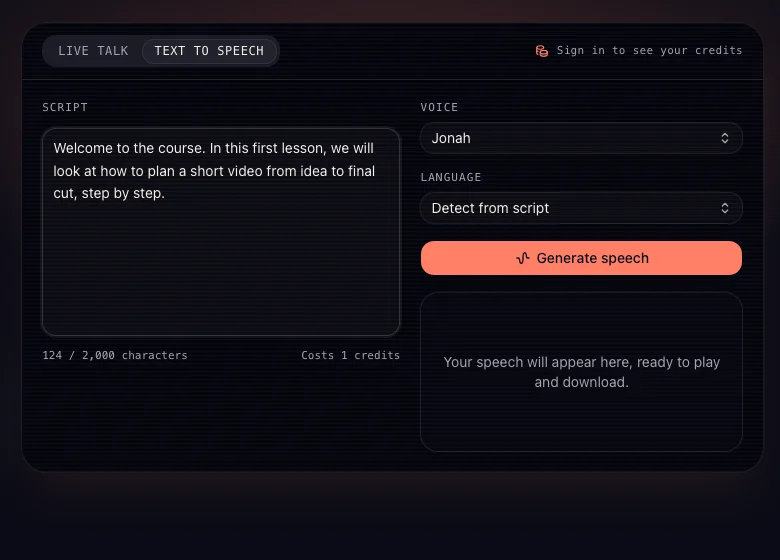
Text to speech costs 1 credit per 160 characters. There is no free plan, but you do not need a subscription: a one-time pack of 200 credits costs $9.90 and never expires, which reads about 32,000 characters. Plans start at $19.90 a month ($13.90 billed yearly), with scripts of up to 2,000, 3,500 or 5,000 characters depending on the plan. Audio made with paid credits can be used commercially with no watermark. Files are stored privately and you can delete them. Try Dessa AI text to speech or see pricing.
2. ElevenLabs: best text to speech for expressive voices
ElevenLabs is a text to speech web studio and an API. The free plan gives 10,000 credits, about 10 minutes, with no commercial license; Starter costs $6 a month for 30,000 credits, Creator $22 and Pro $99. It offers more than 10,000 community voices and covers 70+ languages on its v3 model. Instant voice cloning starts on Starter and professional cloning on Creator. It exports MP3 up to 192 kbps, PCM and Opus, and uses audio tags rather than SSML to direct delivery.
3. Murf AI: best text to speech for business voiceovers
Murf AI is a text to speech studio with 200+ voices in 35 languages. The free plan gives 10 minutes of generation but no downloads; Creator costs $19 a month billed yearly and includes commercial rights, and Business costs $66 a month billed yearly. Paid plans export MP3, WAV and FLAC. Murf works inside Canva, Google Slides, PowerPoint and Captivate, which suits training and slide voiceovers.
4. Speechify Studio: best text to speech for listening and light voiceovers
Speechify is best known for its reading app, which reads documents aloud; Speechify Premium costs $29 a month or $139 a year. Speechify Studio, its text to speech voiceover product, has a free plan with 600 credits and no commercial rights; Starter costs $100 a year and Creator $300 a year. Its API page lists 1,000+ voices and 48 languages.
5. WellSaid: best text to speech for English e-learning
WellSaid is a text to speech studio that lets paid users generate as much as they like and pay only for the minutes they download. The free plan has 3 download minutes a month. Starter costs $19 monthly or $10 billed yearly with 20 download minutes and commercial rights; Pro costs $49 monthly. Self-serve plans are English only, and WAV export is on Business. A pronunciation editor helps with product names and jargon.
6. NaturalReader: best text to speech for reading documents
NaturalReader sells two text to speech product lines. The personal plans (Lite $79 a year, Pro $159 a year) read documents aloud for personal use only. The commercial plans start at $29 a month ($16.50 billed yearly), export 44.1 kHz MP3 and WAV, cover 90+ languages and allow up to 4 cloned voices. It is a good text to voice AI reader for students.
7. Narakeet: best pay-as-you-go text to speech
Narakeet is a text to speech tool with 946 voices in 112 languages. You can try 20 conversions free, then buy time without a subscription: $6 buys 30 minutes, and credits never expire. Any purchase unlocks commercial use, SSML, batch processing and the API. It exports MP3, WAV and M4A, and can also turn slides or a script into a narrated video.
8. TTSMaker: best free text to speech
TTSMaker is a free text to speech website with 600+ voices in 100+ languages. The free tier allows 20,000 characters a week, with ads and captchas; TTSMaker says the audio can be used commercially. Lite costs $13.99 a month for 300,000 characters. It is the text to speech to try when you have no budget.
9. Google Cloud Text-to-Speech: best text to speech for developers
Google Cloud Text-to-Speech is an API, not an app. Its Gemini text to speech voices take style directions in plain language and can voice several speakers in one dialogue: 30 voices across 87 languages. Chirp 3 HD voices include 1 million free characters a month, and older WaveNet and Standard voices 4 million. It exports MP3, OGG Opus, LINEAR16 and PCM.
Other developer options: Microsoft Azure Speech has 400+ voices in 140+ languages with 500,000 free neural characters a month; Amazon Polly charges $4 to $100 per million characters depending on the voice type. OpenAI's tts-1, tts-1-hd and gpt-4o-mini-tts text to speech models are deprecated and shut down on January 6, 2027.
How to Choose a Text to Speech Tool
Start from what you will make, then check the license and the format:
- Commercial use. Most free text to speech tiers do not allow it. If the audio goes into a video, course or ad, use a paid plan that grants commercial rights.
- Export format. WAV is best for editing; MP3 is fine for the final file. Dessa AI exports WAV; Murf and WellSaid keep WAV for paid or business plans.
- Languages. For non-English text to speech, check the language count and listen to a sample; WellSaid's self-serve plans are English only.
- Pricing model. Subscriptions suit steady work. Packs that never expire, like Dessa AI and Narakeet, suit occasional text to voice AI jobs.
- More than reading. If you also want to talk to an AI out loud, Dessa AI includes AI voice chat in the same studio.
For tips on writing scripts that sound natural, read how to use AI voice. To compare the voice models behind these tools, see our best AI voice model guide.
FAQ
What is text to speech?
Text to speech, or text to voice AI, is technology that reads written text aloud in a natural-sounding voice. You paste a script, pick a voice and get audio to play or download.
What is the best free text to speech?
TTSMaker gives 20,000 characters a week free and says the audio can be used commercially. ElevenLabs, Murf and Speechify have free plans too, but without commercial rights. Dessa AI has no free plan; its packs start at $9.90.
Is text to voice AI the same as text to speech?
Yes. Text to voice AI is another name for text to speech: both turn written text into spoken audio. Modern text to speech uses AI voices that sound much closer to a person than older robotic voices.
Can I use text to speech audio commercially?
It depends on the plan. Most tools allow commercial use only on paid plans. On Dessa AI, text to speech made with paid credits can be used in YouTube videos, podcasts, courses and ads with no watermark.
Which text to speech exports WAV?
Dessa AI exports 44.1 kHz WAV on every purchase. Murf, NaturalReader Commercial and Narakeet export WAV on paid plans; WellSaid only on Business.
How many languages does text to speech support?
It varies by tool: Dessa AI reads 39 languages, Narakeet 112 and Microsoft Azure 140+. Always listen to a sample in your language before you pay.